HOME | BUSINESS | RV | MARITIME | ROAMING
Starlink Ethernet Adapter Setup
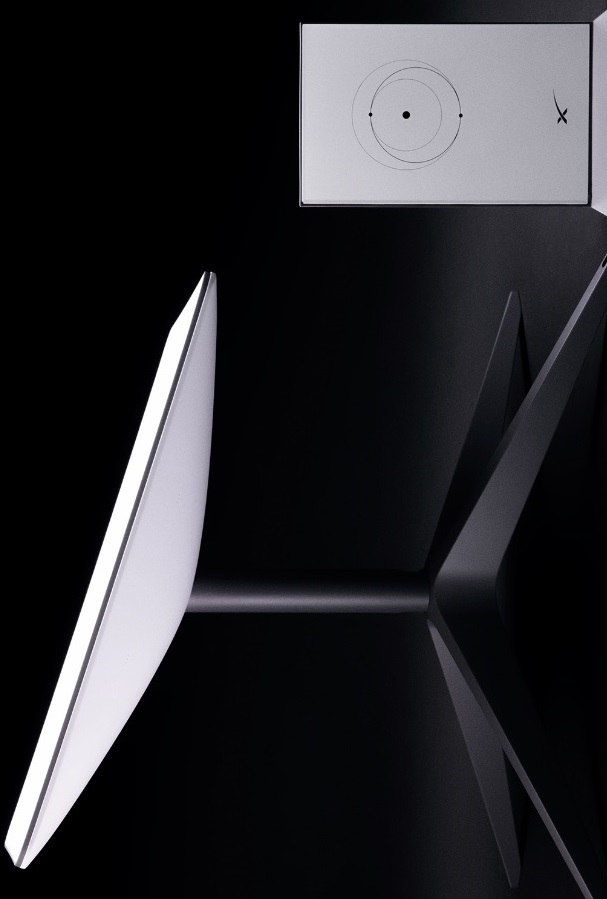
Learn how to install and configure the Starlink Ethernet Adapter for compatible Starlink systems. Connect switches, routers, access points, security cameras, VoIP phones, and business networks.
GET A QUOTE & BOOK YOUR INSTALLATION 
Install and configure the Starlink Ethernet Adapter for compatible Starlink systems
Wireless networking has become the standard method for connecting laptops, smartphones, tablets, televisions, and smart home devices. However, many residential and commercial environments still depend on wired Ethernet connections to provide maximum speed, stability, security, and reliability. For compatible Starlink systems that do not include a built-in Ethernet port, the Starlink Ethernet Adapter provides an efficient method of integrating satellite internet into existing wired network infrastructure.
While Wi-Fi offers convenience and mobility, Ethernet remains the preferred connection for bandwidth-intensive and mission-critical applications. Desktop computers, network-attached storage (NAS), managed switches, enterprise firewalls, wireless access points, IP security cameras, digital signage, VoIP phone systems, point-of-sale terminals, and industrial automation equipment often perform better when connected through wired Ethernet rather than relying exclusively on wireless communication.
The Starlink Ethernet Adapter functions as the bridge between compatible Starlink hardware and traditional Ethernet networking equipment. Once installed, it allows users to distribute internet connectivity through structured cabling systems, connect enterprise networking hardware, or expand wireless coverage using professionally installed access points. This flexibility makes Starlink suitable for much more than basic home internet service, enabling integration into sophisticated residential, commercial, and industrial network environments.
Before installing an Ethernet Adapter, it is important to verify the Starlink hardware generation in use. Some Starlink systems include integrated Ethernet capability, while others require an external adapter to provide wired network access. Confirming equipment compatibility before installation helps ensure proper operation and prevents unnecessary hardware purchases.
Physical installation is generally straightforward, but proper planning improves long-term reliability. The adapter should be installed in a clean, dry, well-ventilated location near the Starlink router or network equipment. Cable connections should remain accessible for future maintenance while avoiding excessive bending, strain, or mechanical stress. Organizing cables using structured cable management techniques simplifies troubleshooting and maintains a professional appearance.
Once Ethernet connectivity is available, numerous network design possibilities become available. Homeowners frequently connect smart televisions, desktop workstations, gaming consoles, media servers, home automation hubs, and surveillance recorders through wired Ethernet to reduce wireless congestion and improve performance. Businesses often extend Starlink service through managed switches, structured cabling systems, enterprise routers, wireless access points, and firewall appliances that support dozens or even hundreds of connected devices.
One of the most common applications involves connecting Starlink to an existing network router. Many advanced users prefer enterprise networking platforms that provide enhanced security, virtual private network (VPN) capabilities, traffic management, parental controls, Quality of Service (QoS), virtual LANs (VLANs), and centralized network administration. Integrating Starlink into these environments allows organizations to maintain established network policies while benefiting from satellite broadband connectivity.
Ethernet also provides the preferred transport for wireless access points deployed throughout larger homes, offices, warehouses, schools, hotels, retail stores, and healthcare facilities. Rather than relying on wireless repeaters that reduce available bandwidth, professionally installed Ethernet cabling delivers full-speed connections to strategically located access points, creating seamless wireless coverage across the property. This architecture supports roaming users, improves network capacity, and delivers more consistent performance for demanding applications.
Security represents another important advantage of wired networking. Ethernet connections are less susceptible to wireless interference and provide a controlled communication path between devices. Businesses handling confidential information, financial transactions, healthcare records, engineering data, or corporate intellectual property often prefer wired infrastructure for critical systems because it supports stronger network segmentation, firewall enforcement, and access control policies.
Network performance can also improve significantly when high-bandwidth devices are moved from Wi-Fi to Ethernet. Video editing workstations, cloud backup servers, streaming equipment, security camera recorders, gaming systems, and file servers benefit from dedicated wired connections that reduce wireless congestion for mobile devices. This balanced approach improves the overall user experience without requiring additional internet bandwidth.
Professional installations often incorporate managed switches to expand available Ethernet ports while supporting advanced network features such as VLAN segmentation, port monitoring, link aggregation, and Power over Ethernet (PoE). PoE technology allows compatible devices including wireless access points, IP cameras, VoIP telephones, and building automation equipment to receive both power and data through a single Ethernet cable, simplifying installation while reducing infrastructure costs.
As networks continue to grow, thoughtful cable management becomes increasingly important. Structured cabling systems, patch panels, equipment racks, cable labeling, and organized routing pathways improve serviceability while simplifying future upgrades. Whether serving a small residence or a large commercial facility, well-designed Ethernet infrastructure provides the flexibility needed to support changing technologies and expanding connectivity requirements.
The Starlink Ethernet Adapter is more than a simple accessory—it serves as the gateway between satellite internet and professional networking infrastructure. By enabling reliable wired connectivity, the adapter allows Starlink to integrate seamlessly with existing residential and enterprise networks, supporting everything from smart homes and home offices to corporate campuses and industrial facilities. When combined with proper network design, quality structured cabling, and professional installation practices, Ethernet connectivity unlocks the full potential of Starlink as a high-performance broadband platform capable of supporting today's most demanding connected environments.
Note: Some Starlink hardware versions (such as certain Gen 3 systems) include Ethernet connectivity, while other models require a separate Ethernet Adapter.
---
What Is the Starlink Ethernet Adapter?
* Purpose of the adapter
* Which Starlink models require it
* Which models include built-in Ethernet
* Differences between Wi-Fi and Ethernet
---
Benefits of Wired Ethernet
* Lower latency
* Greater reliability
* Stable video conferencing
* Faster file transfers
* Reduced Wi-Fi congestion
* Improved gaming performance
* Enterprise networking
---
Connecting Starlink to Existing Networks
* Home routers
* Business routers
* Firewalls
* Managed switches
* SD-WAN
* Multi-WAN routers
* Fiber backup
* Cable backup
---
Ethernet for Smart Homes & Businesses
* Security cameras
* Network Video Recorders (NVRs)
* Smart TVs
* NAS storage
* VoIP phones
* Access control systems
* Digital signage
* Building automation
---
Structured Cabling Best Practices
* Cat6 / Cat6A cabling
* Patch panels
* Cable labeling
* Equipment racks
* PoE switches
* Cable testing
* Future expansion
---
Common Ethernet Configuration Mistakes
* Wrong cable category
* Damaged connectors
* Improper router configuration
* Double NAT
* Poor switch selection
* Overloaded wireless networks
* Ignoring firmware updates
---
Frequently Asked Questions
**Do all Starlink systems require an Ethernet Adapter?**
No. Some Starlink hardware generations include built-in Ethernet connectivity, while others require a compatible Ethernet Adapter for wired networking.
**Can I connect my own router to Starlink?**
Yes. Many users connect Starlink to third-party routers that provide advanced features such as VPN support, firewall protection, VLANs, parental controls, and enterprise management.
**Can I connect multiple wired devices?**
Yes. By connecting the Ethernet Adapter to a network switch, you can support multiple wired devices throughout your home or business.
**Does Ethernet improve internet speed?**
Ethernet does not increase the speed provided by your Starlink service, but it often delivers more consistent performance, lower latency, and greater reliability than Wi-Fi for compatible devices.
**Can I use Power over Ethernet (PoE) with Starlink?**
The Starlink Ethernet Adapter itself does not provide PoE. However, once connected to a compatible PoE switch, you can power supported devices such as wireless access points, IP cameras, and VoIP phones.
---
opical Authority Strategy
This page reinforces your expertise not only in Starlink hardware but also in:
* Ethernet networking
* Structured cabling
* Enterprise networking
* Home networking
* Managed switches
* Firewalls
* Wireless access points
* Network architecture
* PoE infrastructure
* Smart home integration
Learn how to install and configure the Starlink Ethernet Adapter for compatible Starlink systems. Connect switches, routers, access points, security cameras, VoIP phones, and business networks.
